Before you build the company,
agree on it.
Foundation is where partners agree — roles, contributions, equity, and revenue rules — in one place, before anything is filed. Free, and everything downstream runs on what you lock here. Answer once. Launch everywhere.
“Once money flowed, the deal got renegotiated.”
Handshake deals and email agreements broke down the moment revenue actually arrived. Whoever delivered early got squeezed later. Experts had to stay engaged just to defend their share. That's the barrier Foundation removes — by locking every term, signed and hashed, before a single dollar moves.
Average legal cost when a partnership breaks down — plus 4.2 months of lost productivity. Foundation kills this category of cost by locking the deal before formation.
US Small Business Administration aggregate
Silent partners report being “never” or “rarely” updated on company financial state. Foundation makes ownership and rules visible from day one — so partnerships don't decay in the dark.
HYVV survey · n=200 multi-owner LLC operators
Most Partnerships Fail.
Here’s Why.
Equity disputes within 18 months
Studies suggest a majority of partnerships hit equity disputes within 18 months. Partners shake hands on vague terms — six months later, nobody agrees on who owns what.
No written agreements at formation
The operating agreement gets 'dealt with later.' Later never comes — until there's a lawsuit.
Average cost to unwind a partnership
Lawyers, mediators, lost revenue, damaged relationships. Prevention costs a fraction of the cure.
Without Foundation
- Handshake agreements
- Vague equity promises
- No exit plan discussed
- Revenue splits 'figured out later'
- One founder does everything
With Foundation
- Written, signed commitments
- Visual equity with vesting
- Exit timelines agreed upfront
- Automated waterfall splits
- Roles and contributions documented
From First Meeting to
Formation-Ready
Six steps. Under an hour. Every partner aligned.
Gather the Team
Invite all co-founders, investors, and advisors to the Foundation table. Each person gets their own profile to fill out.
Define Contributions
Each partner declares their time, capital, IP, and expertise. Everything is visible to all parties — radical transparency from day one.
Negotiate Equity
Use interactive sliders to propose splits. See a live donut chart update. Discuss, adjust, agree. No spreadsheets, no ambiguity.
Configure Revenue Shares
Set waterfall priority, percentage splits, caps, and payout frequency. Run simulations at different revenue levels.
Review the Package
HYVV auto-generates your operating agreement and revenue share terms. Optionally, review AI-drafted business plan, financial model, and market analysis.
Vote & Launch
Every partner signs digitally. Unanimous approval locks the Foundation and unlocks Hyper Formation. Formation is one click away.
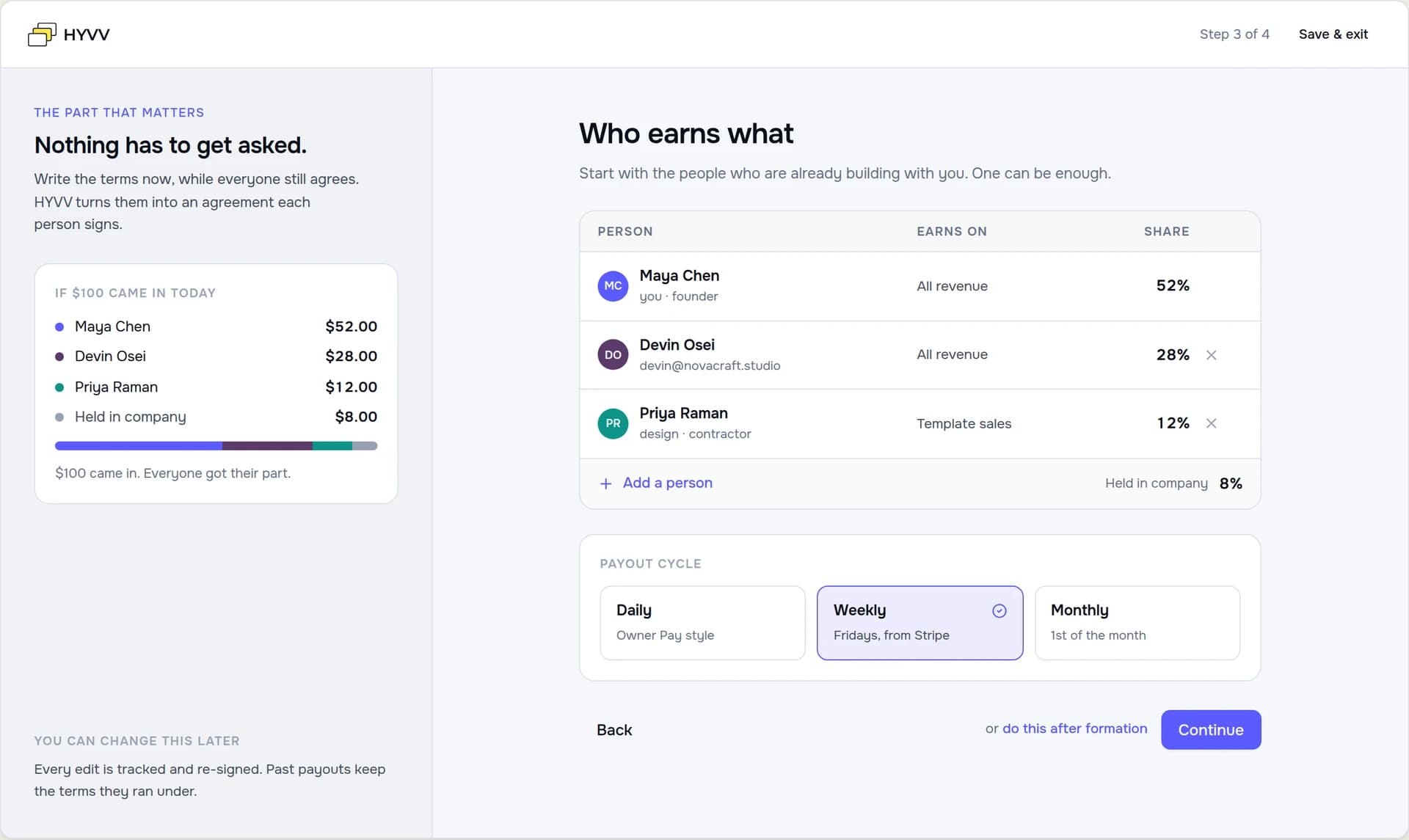
The whole agreement, in four steps.
Account, company basics, who earns what, then handoff — the same screens, not a redraw of them.
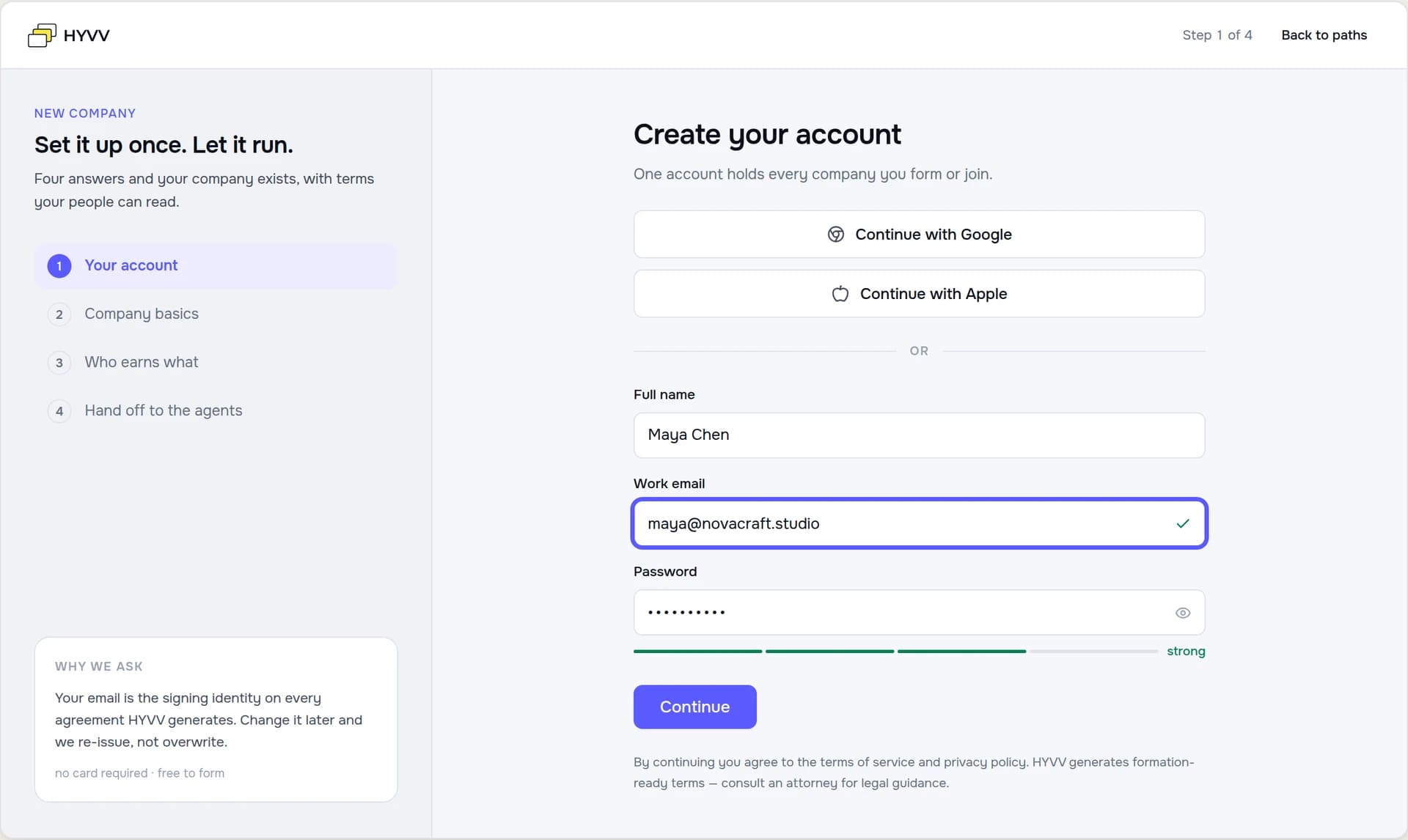
Your account
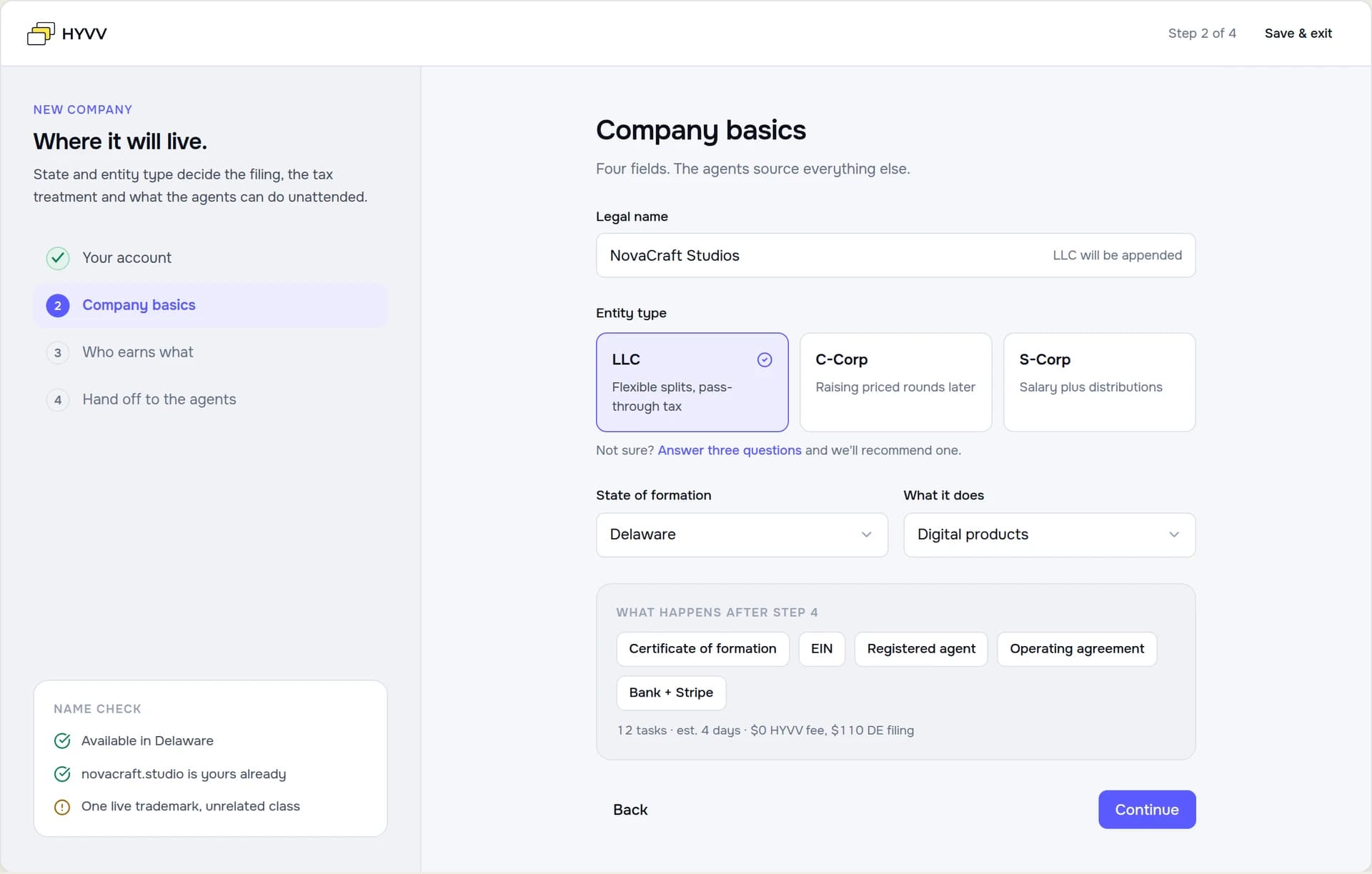
Company basics
Who earns what
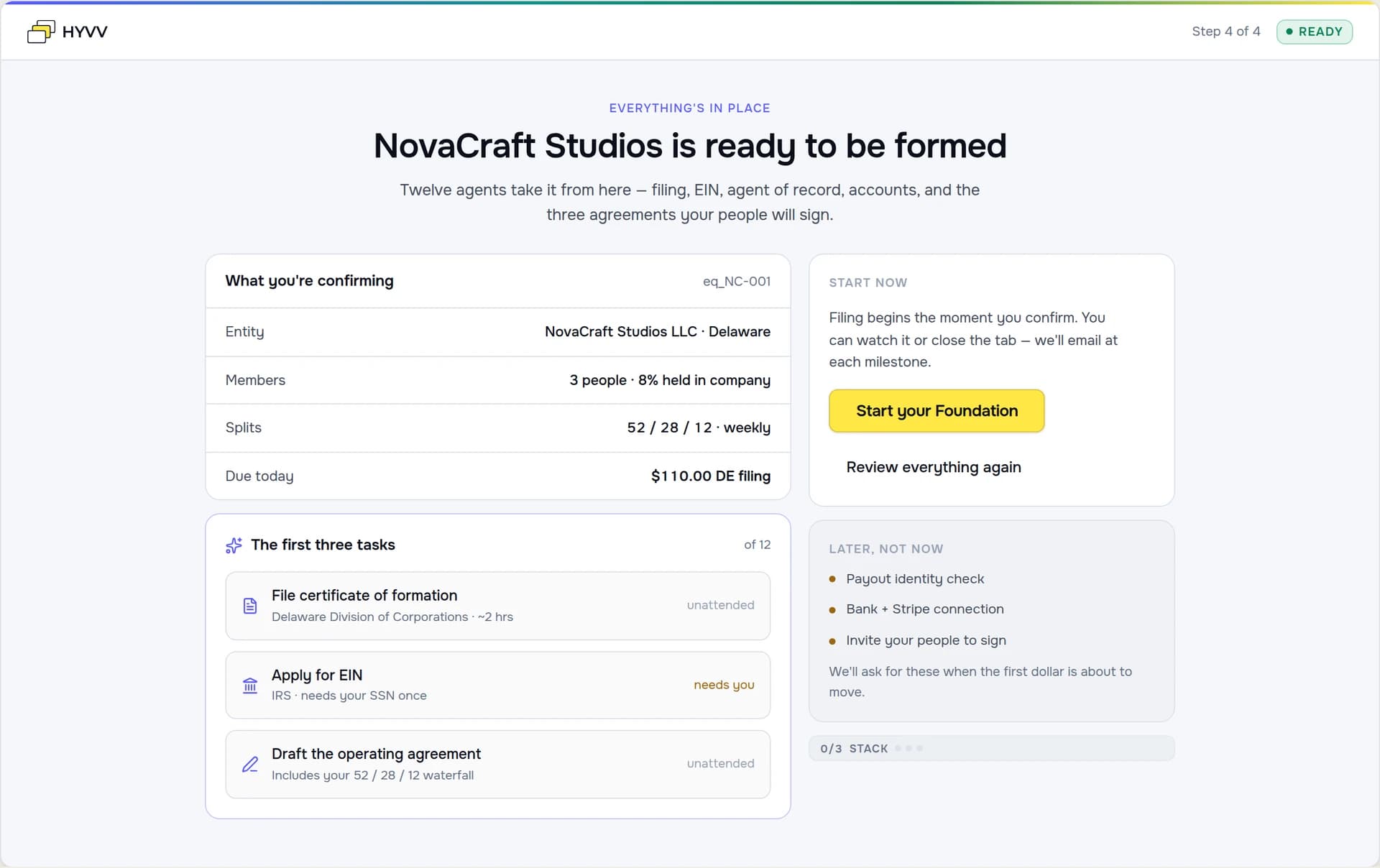
Handoff
Everyone Shows Their Hand
Before equity is split, every founder defines their commitment. HYVV scores alignment automatically so no one gets a raw deal.
Alex Chen
CEO & Technical Co-founder
Full-time (50+ hrs/wk)
$50,000
35%
Engineering, Product, Architecture
Core platform codebase
5+ years (long-term)
Strong alignment — commitment matches equity ask
Split It Fairly. See It Clearly.
Equity Split
Revenue Share
At $10,000/month:
From Conversation to Company Blueprint
Foundation compiles everything into a complete business-ready package.
Operating Agreement
Custom-drafted from your equity and governance terms
Revenue Share Agreements
Per-partner waterfall rules, caps, and schedules
Business Plan
Executive summary, market analysis, financial model
Financial Model
3-scenario projections with break-even analysis
Brand Identity
Company name, logo, color palette, domain
Market Analysis
Competitive landscape, TAM/SAM/SOM, positioning
All documents update automatically when Foundation terms change.
Unanimous Approval
2 of 3 approved
From Foundation to HYVV Corp.
Foundation is step one. Hyper Formation files the company. Then connect the operating stack — Bank, Payments, Books — and your company earns the HYVV CORP mark.
01
Foundation
Align partners on roles, equity, and revenue rules.
02
Formation
Hyper Formation files the entity in 2 weeks flat.
03
HYVV Corp
Connect Bank · Payments · Books. Get the verified badge.
HYVV Stack
Full stack connected
3/3 connected
01Bank· Mercury
$84,210 available · last sync 2 min ago
02Payments· Stripe Connect
Payouts daily · $12,847 in transit
03Books· QuickBooks Online
1,247 transactions reconciled · 0 exceptions
HYVV CORP · CERTIFIED
Bank✓Stripe✓Books✓
The badge isn't decorative.
It's operational.
Auto-reconciled books
Every Stripe payout, refund, and fee posts to the right ledger account.
One-click payouts
Distributions move from Stripe to recipients without manual transfers.
Verified on every receipt
The HYVV CORP mark appears on shared receipts and your public profile.
Built on Transparency
Version-controlled terms
Every edit is tracked. See what changed and when.
Locked after approval
Once all partners sign, terms are immutable until an amendment is requested.
Full transparency
Every partner sees the same terms. No side deals, no hidden clauses.
Not legal advice
HYVV generates formation-ready terms. Consult an attorney for legal guidance.
Foundation locks the plan. Hyper Formation runs it.
Foundation is free. When your partners have signed off unanimously, upgrade to Hyper Formation — starting at $300 — and we form the entity, file the EIN, open Stripe Connect, draft your operating agreement, and configure your dashboard. Go Concierge and we run the whole thing end-to-end, live in about two weeks.
- Foundation alignment is free
- Starting at $300, no monthly
- LLC + EIN + Stripe Connect
- Concierge: our part in 10 business days, or the fee back
What founders ask before they commit.
Direct answers, no marketing fluff. If you have a question that's not here, email rob@hyvv.io.
Answer once. Launch everywhere.
Align roles, equity, and revenue with your partners before you file — so everything downstream runs clean.
Free to start · Or import an existing company